
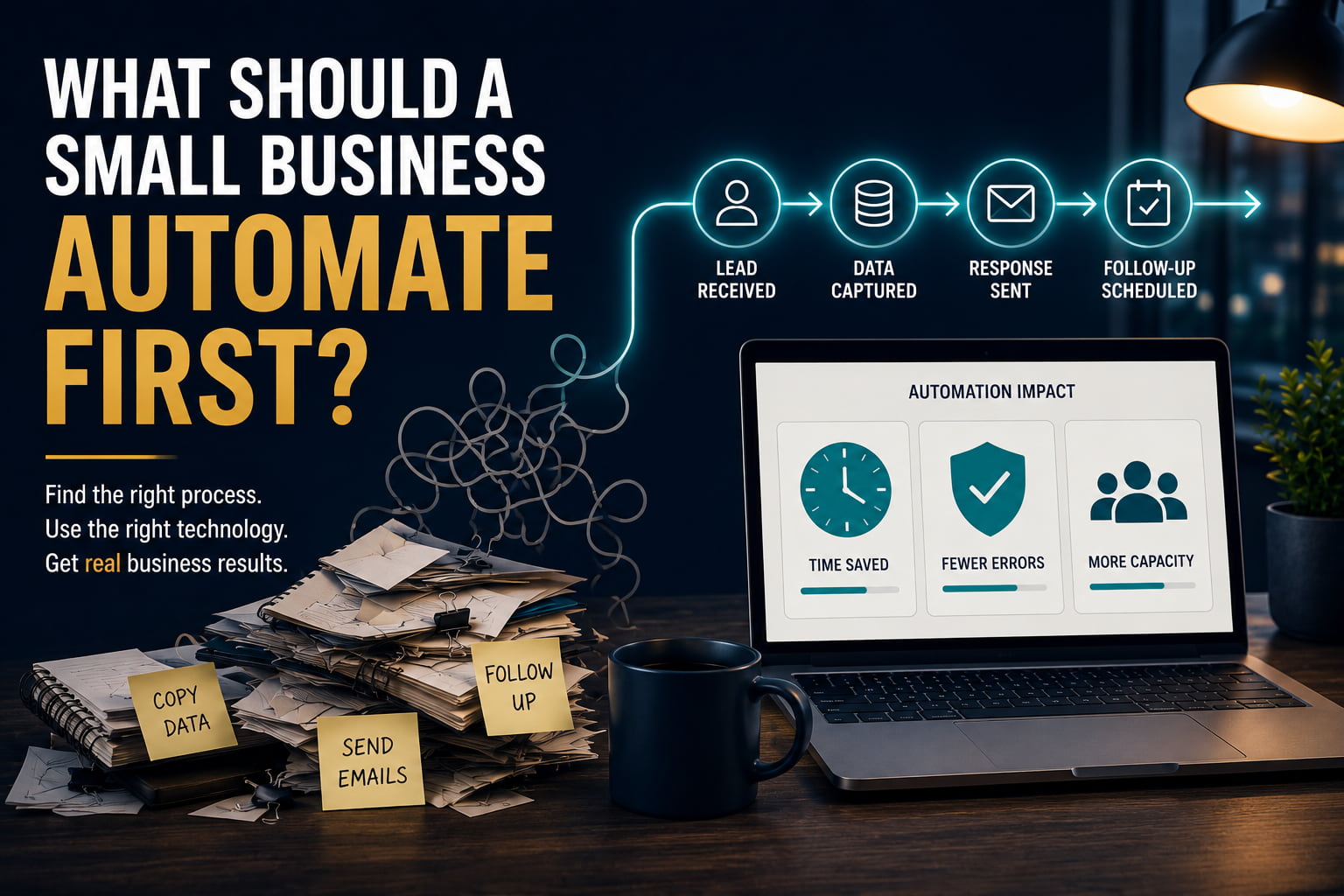
A customer fills in a form on your website. Someone notices the email twenty minutes later and forwards it to the right person. That person copies the customer’s details into a spreadsheet or CRM, sends a message, and makes a note to follow up later.
Meanwhile, somebody else is checking which invoices are overdue. Appointments are being confirmed one by one. Information is being copied from one system into another. A weekly report is being rebuilt from data that already exists in three different places.
None of this work is particularly difficult.
But together, it can consume hours.
Eventually somebody asks the obvious question:
Can we automate this?
The question is increasingly relevant. The OECD’s 2026 D4SME survey, based on a non-representative sample of more than 2,000 SMEs across 12 OECD countries, found that adoption of AI tools is increasing rapidly. But strategic, targeted and secure integration into business operations remains uneven, with time constraints, maintenance costs and skills gaps continuing to impede implementation.
There is also an important distinction hiding inside the current AI boom.
A 2026 U.S. Chamber of Commerce Foundation/Ipsos study found that half of workers at small businesses were already using AI at work. But among those using AI, 64% said their primary use was personal productivity such as drafting, summarising and brainstorming. Another 26% used it for recurring tasks. Only 6% said they were using AI to automate workflows with minimal human involvement.
Using AI is therefore not the same thing as automating a business.
And before choosing Zapier, Make, n8n, an AI agent or anything else, there is a more important question:
Of everything your business does repeatedly, what should you automate first?
Everyone says automate. But automate what?
The easiest mistake is to begin with the software.
A business subscribes to an automation platform because automation is supposed to save time. Someone watches a demonstration of an AI agent updating spreadsheets, sending emails and moving information between applications, and the conversation becomes:
What could we make this tool do?
That reverses the order.
The business should first identify a workflow worth improving.
Only then should it decide what technology, if any, belongs inside that workflow.
Not all repetitive work deserves automation. A tedious task that takes an employee ten minutes twice a year may be irritating but commercially insignificant. A three-minute task performed 150 times every week may barely be noticed yet consume a substantial amount of staff time.
Another process may consume many hours but still be a poor automation candidate because every case requires unusual judgment. A different process may be extremely easy to automate but so unimportant that doing so creates almost no measurable value.
The starting question is therefore not:
What can this software automate?
It is:
Where is the business repeatedly losing time, money, reliability or opportunity?
Before automating a process, ask whether it should exist
Automation can make a bad process run faster.
That does not make it a good process.
A 2026 systematic review examining 83 peer-reviewed studies of robotic process automation and business process management found that successful automation depends not only on technology but on process selection, implementation, lifecycle management, governance and continued improvement. The traditional automation literature consistently favors processes that are high-volume, rule-driven, digitally accessible and sufficiently stable.
Modern AI expands what can be automated, particularly where inputs are unstructured or interpretation is required. It does not remove the need to understand the underlying work.
So before asking how to automate something, ask a more uncomfortable question:
Why are we doing this at all?
A report that nobody reads does not need automated reporting. It needs deleting.
An approval that exists only because “we have always done it this way” may not need an automated approval system. It may need removing.
A form that asks a customer for information the company already possesses may not need an automated data-transfer workflow. The duplicate request may need eliminating.
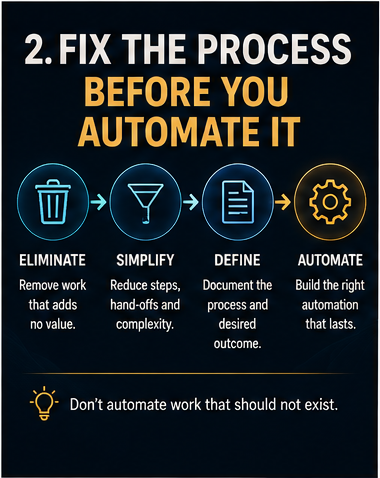
A useful sequence is therefore:
Eliminate → Simplify → Define → Automate
The word define matters.
Traditional automation generally needs a predictable sequence of actions. AI can tolerate considerably more variation in the inputs and, in some cases, the route taken. But the business still needs to understand the objective, acceptable outcomes, important exceptions and boundaries.
Automation cannot reliably fix a process the business itself does not understand.
Four questions determine whether a process is ready for automation
There is no universal formula that can tell every business what to automate.
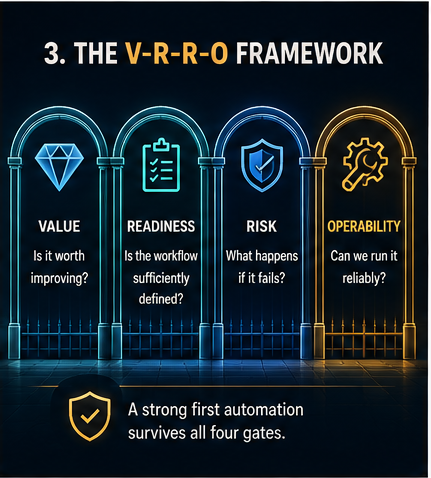
But the research repeatedly points toward several factors that matter. We have combined them into what we call the NakuNet Value–Readiness–Risk–Operability framework.
This is an editorial decision framework synthesised from the evidence, not a scientifically validated scoring formula. We deliberately do not turn it into an overall score such as “82% automation ready.”
Why?
Because averaging the factors can hide what matters.
An automation could have enormous potential value but unacceptable risk. Another could be technically simple but impossible for the business to maintain reliably.
The four gates should therefore be considered separately.
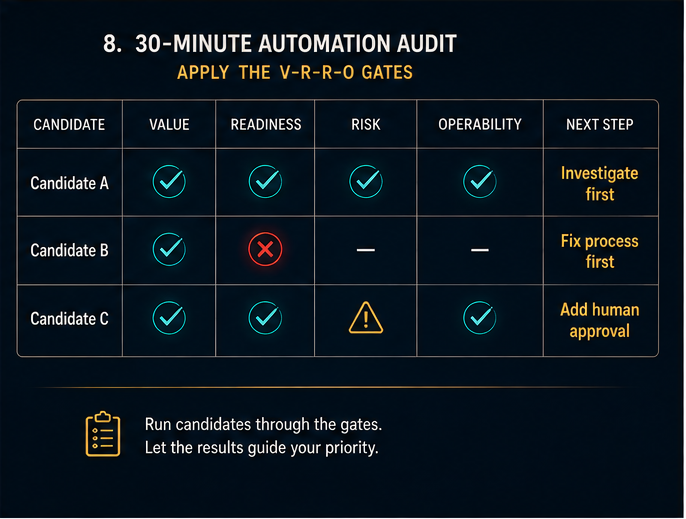
| Gate | Question |
|---|---|
| Value | Is improving this workflow worth doing? |
| Readiness | Is the work sufficiently understood and bounded? |
| Risk | What happens when the automation gets something wrong? |
| Operability | Can the business reliably run and maintain it afterwards? |
A good first automation should survive all four.
Gate 1: Value — is the problem worth solving?
Start with what actually happens today.
How often does the workflow occur? How long does each occurrence take? How many employees touch it? Do delays affect revenue or cash flow? Do mistakes create rework? Does the process repeatedly interrupt people who could be doing higher-value work?
Consider two hypothetical processes.
Process A happens once every three months and takes an employee two hours.
Process B requires somebody to spend two minutes copying enquiry details into a CRM, but it happens 25 times every working day.
Process A feels worse when somebody has to perform it.
Process B consumes far more labour over the year.
Frequency matters.
But time is not the only source of value.
Automating lead routing might save only a few minutes per enquiry, while its greater value comes from getting prospects to the correct salesperson faster.
An invoice reminder may save almost no intellectual effort, but forgetting it can affect cash collection.
An appointment reminder may take seconds, while its real value may be reducing no-shows.
Automation can therefore produce value in at least four different ways: actual cash savings, released staff capacity, protected or increased revenue, and improved reliability or reduced errors.
Those should not be treated as though they are all the same thing.
Gate 2: Readiness — is the workflow ready for automation?
A process can be valuable and still not be ready.
Traditional process-automation research consistently finds stronger candidates among workflows with frequent execution, clear rules, stable inputs, accessible data and relatively low levels of exception handling.
AI changes part of that equation.
Imagine a company receiving hundreds of customer emails.
The inputs are highly variable. Customers use different words, combine several questions in one message and occasionally explain the problem badly.
Trying to classify those emails using hundreds of rigid keyword rules could create a fragile system.
But the output might be tightly bounded:
Sales / Billing / Support / Other / Needs human review
An AI model may be useful for interpreting the unpredictable language even though the surrounding workflow remains highly structured.
So instead of asking whether every input is standardized, ask:
Is the problem sufficiently bounded that we know what success and failure look like?
Before automating a workflow, the business should be able to describe its trigger, expected outcome, major steps, common exceptions and success criteria.
If five employees perform the same job in five completely different ways and nobody can explain why, the company probably has a process-design problem before it has an automation opportunity.
Gate 3: Risk — what happens when it fails?
This is where simplistic automation advice becomes dangerous.
A process can be frequent, expensive and technically easy to automate while still being a poor candidate for full autonomy.
Consider a system that approves payments.
Perhaps the rules are clear. Perhaps employees spend substantial time processing them. Perhaps automation could save hundreds of hours.
But one incorrect high-value payment could cost more than a year’s worth of saved labour.
That is why risk cannot simply become another few points inside an overall automation score.
Ask what happens when the system is wrong.
Is the action reversible? Could a customer lose money? Could confidential information be exposed? Could a contractual commitment be created? Would anybody notice a silent failure? How much authority does the automation actually need?
This becomes more important as businesses deploy AI agents capable of acting across several systems. NIST’s 2026 work on agent identity and authorization specifically highlights the risks associated with giving agents access to diverse datasets, applications and tools, and examines identification, authorization, auditing, delegation of authority and least-privilege controls.
A useful principle follows:
Automate the work around high-stakes judgment before automating the judgment itself.
A customer complaint system, for example, might retrieve the account history, locate the relevant policy, summarise what happened and prepare a draft response.
A person can still decide whether the company should issue a substantial refund.
Much of the administrative burden disappears without transferring unrestricted authority to the machine.
Gate 4: Operability — can you keep it working?
This is the part most automation demonstrations do not show.
The demo ends when the workflow succeeds.
The business starts living with it the following morning.
What happens when an API changes? What happens when somebody renames a spreadsheet column? What happens when the source information is incomplete? Who receives the error? Who notices that 17 transactions failed? Who understands how to repair the workflow six months after the person who built it has left?
The 2026 systematic review of RPA and business-process research treats automation as a lifecycle rather than a one-time implementation. Maintenance, governance, continuous improvement, integration and organizational ownership all appear as important dimensions.
A production automation is therefore incomplete until the business knows what happens when it fails.
Four questions expose most of the problem:
Who owns it?
Who gets notified when it fails?
Can the work continue manually if necessary?
Can we determine afterwards what happened?
Monitoring becomes particularly important with AI-enabled systems, whose behaviour can be more variable than ordinary deterministic software. NIST’s 2026 report on deployed AI systems identifies challenges including performance degradation, fragmented logging and the difficulty of scaling human monitoring as systems expand.
A workflow that saves three hours each month but needs four hours of maintenance has not achieved much.
So which processes should a small business investigate first?
There is no single answer across every business.
A dental practice, ecommerce company, construction firm, law office and marketing agency do not experience the same bottlenecks.
But some workflows are sensible places to investigate because they often combine repetition, measurable outcomes and manageable risk.
| Workflow | Why investigate it | Likely starting architecture | What to measure |
|---|---|---|---|
| Lead capture, routing and alerts | Time-sensitive and revenue-linked | Rules-based workflow | Response time, missed leads |
| Appointment booking and reminders | Predictable and reversible | Rules-based workflow | No-shows, admin time |
| Invoice/payment reminders | Repetitive with cash-flow implications | Rules-based workflow | Days overdue, chasing time |
| Moving data between systems | High repetition and error potential | API/workflow | Hours consumed, error rate |
| Recurring reports and notifications | Repeated with known outputs | Rules-based workflow | Preparation time, corrections |
| Customer/employee onboarding | Repeated handoffs and reminders | Workflow automation | Completion time, missing steps |
| Document extraction/generation | Repetitive but may involve unstructured information | Workflow + AI | Processing time, correction rate |
| Inbox/request classification | Variable language, bounded outcome | Workflow + AI | Routing accuracy, human-review rate |
Notice what this table does not say.
It does not say that every business should automate invoicing first.
For some businesses, invoicing automation may be extremely valuable.
For another company issuing ten invoices a year while processing hundreds of sales enquiries every week, it may be almost irrelevant.
The point is to examine promising workflows through the four gates and see where value, readiness, manageable risk and operability meet.

Rules, AI or an agent?
One of the easiest ways to make automation unnecessarily expensive is to use more sophisticated technology than the problem requires.
AI is not automatically better automation.
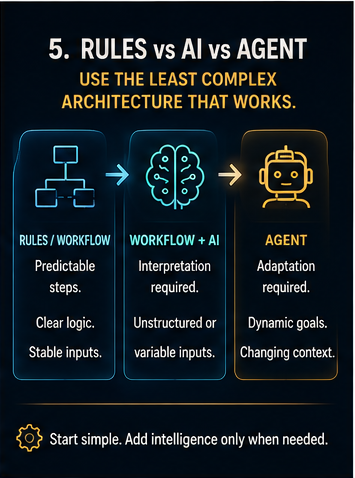
One useful way to separate the available architectures is to distinguish fixed workflows, workflows that use AI for an interpretive step, and agents that can adapt their route across several steps. OpenAI’s current guidance uses essentially this distinction: predefined workflow automation is suited to stable repetitive tasks, while agents add the ability to plan, choose tools and adapt when conditions change.
That gives us a useful rule:
Use the least complex architecture that reliably solves the problem.
If the requirement is:
Invoice becomes seven days overdue → send reminder.
That probably does not require an AI agent.
If the requirement is:
Read this incoming message and determine whether it is a billing enquiry, sales enquiry or complaint.
An AI classification step might be simpler and easier to maintain than an enormous set of keyword rules.
If the requirement is:
Research a potential customer, gather information from several sources, decide which information matters, prepare a briefing and adapt when information is missing.
That begins to resemble agentic work.
And the technologies do not have to be mutually exclusive.
A fixed workflow can invoke an AI model for one interpretive step and then return to ordinary automation.
An agent can operate inside boundaries enforced by deterministic rules.
There is no prize for making an automation more intelligent than necessary.
Human involvement should depend on consequence, not fashion
The debate is often framed as a choice between letting AI run autonomously and “keeping a human in the loop.”
The better question is:
Where does human judgment create enough value to justify the delay and cost?
For routine, reversible and low-consequence actions, requiring manual approval every time can eliminate much of the benefit of automation.
But for a substantial payment, sensitive dispute, hiring decision, legal judgment or contractual commitment, human authority may be essential.
OpenAI’s current agent guidance explicitly emphasizes guardrails, confirmation and human supervision for sensitive or higher-risk actions, while limiting what agents are permitted to do.
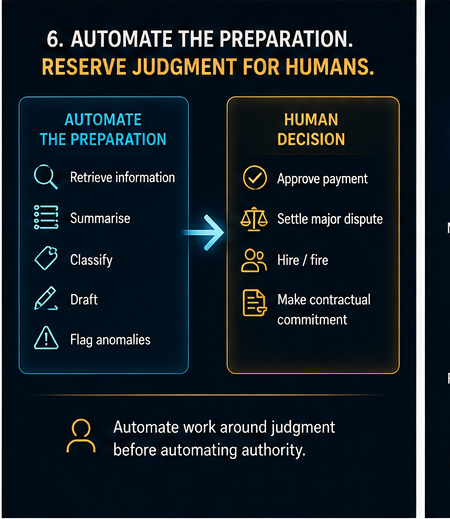
The useful boundary is often between automating preparation and automating authority.
A hiring workflow might collect applications, extract experience and prepare structured summaries while a person makes the employment decision.
A complaint workflow can retrieve history and draft possible responses while a manager approves substantial compensation.
A finance workflow can reconcile information, identify anomalies and prepare a payment while a responsible person authorizes a large transfer.
The strongest architecture is often neither fully manual nor fully autonomous.
Routine cases can pass automatically. Unusual or low-confidence cases can escalate. High-consequence actions can require approval. Repeated failures can stop the automation.
The objective is to remove unnecessary human work without removing necessary human accountability.
Do not confuse time saved with money saved
Automation vendors understandably like calculations showing how many hours their software saves.
Those calculations can be useful.
But they are often misinterpreted.
Suppose reliable measurement shows that a workflow previously required 100 hours of employee time per month and automation reduces that to 30.
The business has released roughly 70 hours of capacity.
It has not necessarily saved 70 hours of payroll cash.
The U.S. Chamber/Ipsos research illustrates the difference. Among small-business AI users experiencing productivity gains, 59% said they used the resulting time to perform more work or produce higher-quality work. Time was also redirected toward learning, planning and new responsibilities.
The economic case should therefore distinguish different kinds of value.
Hard financial savings happen when cash genuinely changes: perhaps overtime disappears, contractor hours fall or rework costs decline.
Capacity value occurs when employees have more time available for productive work.
Revenue value may come from faster lead handling, fewer missed follow-ups, faster invoicing or fewer no-shows.
Quality and risk value can come from fewer mistakes, better consistency or stronger auditability.
And the cost side must include more than the subscription:
implementation + software + integrations + usage charges + maintenance + monitoring + exception handling + failure/rework cost
A cheap automation with expensive failures may not be cheap at all.
Measure before you automate
There is one step businesses often skip entirely.
Before changing the workflow, establish what happens today.
Otherwise there is nothing reliable to compare the new system against.
You do not need an analytics department. A small baseline is enough.
| Workflow | Useful baseline |
|---|---|
| Lead handling | Response time, missed leads, conversion |
| Appointments | No-show rate, admin time per booking |
| Invoicing | Days to payment, overdue invoices, chasing time |
| Data entry | Transactions processed, time per transaction, correction rate |
| Customer support | Response time, resolution time, reopened issues |
| Reporting | Staff hours per report, errors and corrections |
If nobody knows the current lead-response time, then after automation saying “we respond much faster now” is an impression.
It is not a result.
A better sequence is:
Measure → Improve → Automate → Measure again
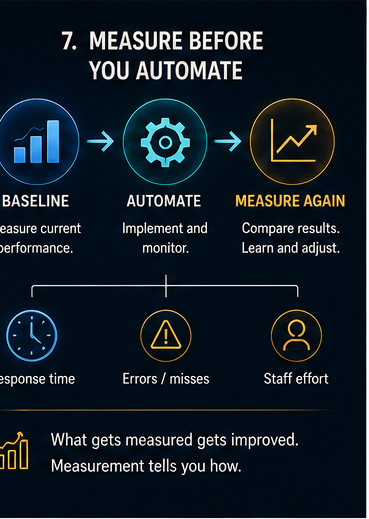
That turns automation from an interesting technology project into an operational experiment.
A simple 30-minute automation audit
You do not need to begin with a large transformation project.
Look at what actually happened during the previous week or month.
Identify a handful of workflows where people repeatedly copy information, chase somebody, send reminders, check statuses, recreate reports, move records between systems or perform the same routine decision.
Then examine each candidate.
| Question | Candidate A | Candidate B | Candidate C |
|---|---|---|---|
| How many times did it happen last month? | |||
| Approximate minutes per occurrence? | |||
| How many errors, delays or misses? | |||
| Is the trigger clear? | |||
| Is the desired outcome clear? | |||
| Are exceptions manageable? | |||
| Is failure low-consequence or reversible? | |||
| Who would own the automation? | |||
| How would failure be detected? | |||
| Can improvement be measured? |
Do not worry about creating an overall score.
The discussion is more useful than the number.
If a candidate looks excellent until somebody asks, “How would we know if it silently stopped working?”, that question has exposed an important weakness.
A boring workflow that answers every question cleanly may be the better first automation.
Start smaller than the whole process—but bigger than a gimmick
There are two opposite mistakes.
One is trying to automate an entire department.
The other is choosing a pilot so trivial that even perfect success proves almost nothing.
A better first project is the smallest useful slice of an important workflow.
Suppose the real problem is missed sales enquiries.
You do not need to begin by building an autonomous AI salesperson.
A useful first version might simply:
capture every enquiry → create the record → assign ownership → acknowledge receipt → notify the responsible person → create a follow-up if nothing happens
That already solves a real business problem.
Now measure it.
Did response times fall?
Were fewer leads missed?
How often did the workflow fail?
How much administration disappeared?
Only then decide whether AI should classify enquiries, draft responses or perform more of the sales workflow.
Automation should expand because evidence justifies expansion, not simply because the software offers another feature.
Security becomes more important as automation gains authority
The OECD’s 2026 SME research identifies cybersecurity as an important digitalisation challenge. That becomes particularly relevant when software is no longer merely storing or analysing information but is being given permission to act across multiple business systems.
NIST’s current agent-security work similarly focuses on authorization, delegation, auditing and the risks created when software agents gain access to multiple tools and data sources.
A useful principle is:
Give every automation the minimum authority required to perform its job.
If it only needs to read information, it may not require unrestricted write access.
If it only needs to prepare a draft, it may not need permission to send it.
If it needs to recommend an action, it may not need permission to approve it.
That does not make automation powerless.
It limits the damage one failure can cause.
So what should a small business automate first?
Not the process with the most impressive AI demonstration.
Not necessarily the task employees complain about most.
Not whatever an automation platform happens to promote.
And not automatically the process that consumes the greatest number of staff hours.
The strongest first candidate is usually a bounded, recurring workflow that creates meaningful business value, is understood well enough to measure, has manageable consequences when something goes wrong, and can be monitored and maintained after launch.
For one company that may be lead follow-up.
For another, invoice reminders.
For another, appointment confirmations.
For another, it may simply be stopping employees from entering the same information into three different systems every day.
The technology comes afterwards.
Use ordinary workflow automation when ordinary rules solve the problem.
Add AI when interpretation creates genuine value.
Use agents when the work genuinely requires adaptation and multi-step reasoning.
Keep people where judgment, empathy, authority and accountability justify their involvement.
The question is therefore not:
How much of our business can we automate?
It is:
Where can automation remove unnecessary work without creating a more expensive problem somewhere else?
That is a much better place to start.