
You generate a frame that looks almost photographic.
The face is right. The lighting works. Skin has texture. Clothing looks natural. The background could have come from a commercial shoot.
As a still image, there is very little to complain about.
Then you press play.
The person’s face changes almost imperceptibly as they turn. Their body moves, but it does not quite seem to have weight. A hand reaches for an object and the contact feels wrong. The camera glides through the scene with suspicious smoothness. Something in the background shifts. The sound is technically appropriate but somehow does not belong to what you are watching.
Nothing may be dramatically broken.
Yet the entire clip feels artificial.
That gap between looking real and behaving real is becoming one of the most important problems in AI video.
Recent research is finding exactly this distinction. NVIDIA’s PhyWorldBench was created because current video models can produce highly photorealistic content while still struggling to reproduce physical behaviour reliably across time. Its 1,050 test prompts examine everything from basic object motion to rigid-body interactions and human or animal movement.
The problem is increasingly not what an AI video looks like when you pause it.
It is what happens when you press play.
A beautiful frame and a believable event are different achievements
A still image only has to survive a spatial test.
Does the face look believable? Is the lighting plausible? Do the materials look right? Does the composition resemble photography?
Video has to pass all of those tests while changing through time.
Now the viewer is also judging whether the same person remains the same person, whether feet actually appear to carry body weight, whether clothing reacts appropriately to movement, whether a hand really grips an object, whether the background stays geometrically stable and whether visible events produce the sounds we expect.
That extra dimension is difficult enough that researchers are creating new benchmarks specifically for it.
The 2026 What Are You Doing? benchmark, for example, contains 1,544 carefully annotated videos covering nine aspects of human generation, including actions, interactions and motion. The researchers created it because existing datasets and conventional evaluation metrics were not adequately capturing how well video generators handle complex human behaviour.
In other words, a clip can be visually impressive and still fail as an event.

Six realism checks reveal where the illusion is breaking
When an AI-generated clip feels wrong, blaming “the prompt” is usually too vague.
A better diagnosis separates six different problems.
Identity and continuity: Do people, clothes, objects and locations remain themselves as the shot progresses?
Physics and interaction: Do weight, contact, collisions and materials behave in ways that make sense?
Human motion: Do faces, eyes, hands, posture and body movement behave naturally?
Camera and world: Does the camera appear to have a reason for moving, and does the environment stay spatially coherent around it?
Sound: Does what you hear belong to what you see, at the correct time and in the correct space?
Edit: Are you actually showing the strongest part of the generation, for the amount of time it can survive convincingly?
These problems can overlap, but separating them matters because the appropriate fix is different.
A color mismatch may be an editing problem.
A drifting face usually is not.
Identity consistency has improved—but consistency does not mean freezing a face
Character consistency is substantially better than it was even a short time ago.
Modern workflows can use reference images, keyframes and other conditioning methods instead of asking the model to reinvent a character from nothing in every shot.
But identity preservation introduces a more subtle challenge.
A real face does not remain visually identical when someone turns, speaks, smiles or changes expression. Research such as ReactID is specifically trying to balance two objectives that can conflict: preserving a person’s identity while still allowing realistic, dynamic action.
That gives creators an important target.
The goal is not:
Make every frame of the person’s face identical.
It is:
Keep the person recognizably the same while allowing the natural variations that real movement requires.
Too little identity control produces drift.
Too much can produce a face that feels unnaturally locked onto the character.
Believability sits between those extremes.
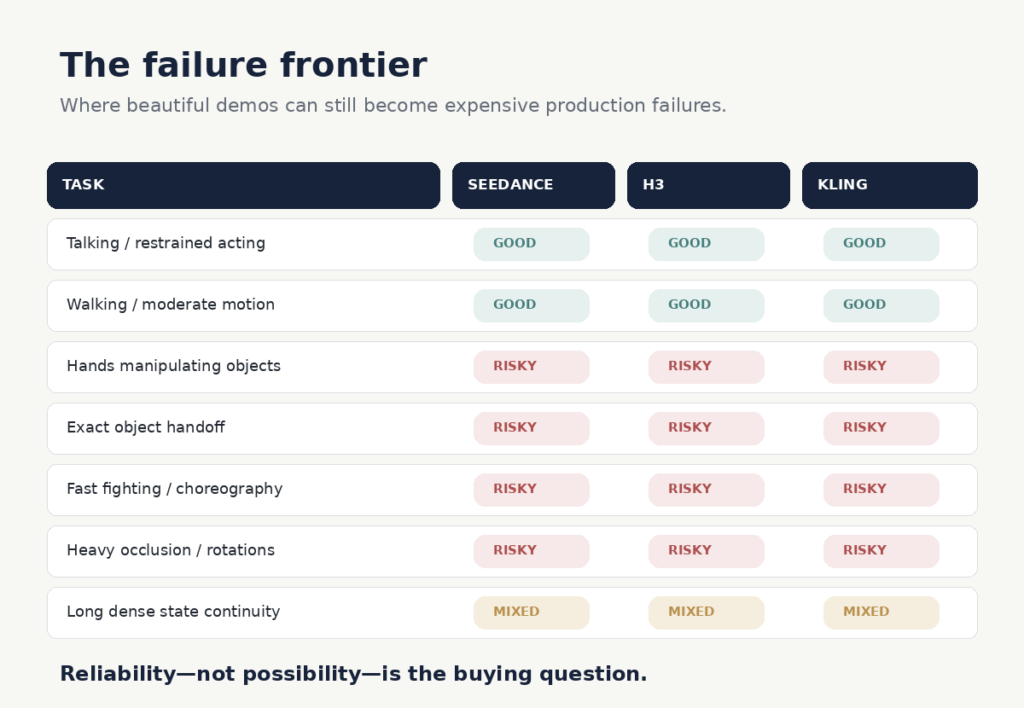
Physics remains one of AI video’s most stubborn weaknesses
A model does not only have to know what a glass looks like.
If someone picks it up, it has to understand where the fingers should contact it, how the hand moves around it, which parts become occluded, how the object follows the hand and what happens when it is placed back onto a surface.
Add liquid and the model now has to deal with gravity, containment, material behaviour and collision as well.
This is where visually excellent AI video can quickly expose itself.
PhyWorldBench and the newer PAI-Bench both report the same broader problem: modern video generators can achieve strong visual fidelity while still struggling with physically coherent dynamics. PAI-Bench evaluates 2,808 real-world cases and found continuing weaknesses in physical plausibility and causal behaviour.
That does not mean creators should avoid physical interaction.
It means interaction complexity is a production variable.
A person already holding a coffee cup is easier than showing them reach for it, wrap their fingers around it, lift it, pour from it and put it back down.
Each additional relationship gives the model something else it must preserve correctly through time.
Human motion is even less forgiving
People are unusually sensitive to the way other people move.
We may not consciously calculate biomechanics when someone walks, but we have spent our entire lives observing how humans transfer weight, how shoulders respond to arm movement, how expressions change during speech and how bodies anticipate contact with objects.
That makes human movement a difficult place to hide mistakes.
The What Are You Doing? researchers explicitly focus on actions and interactions because ordinary image-quality measures do not tell the whole story of whether a generated human actually moves convincingly.
A person can therefore look outstanding while standing still and become noticeably synthetic as soon as they start walking, speaking, sitting or handling something.
The problem is not simply anatomy.
It is anatomy over time.
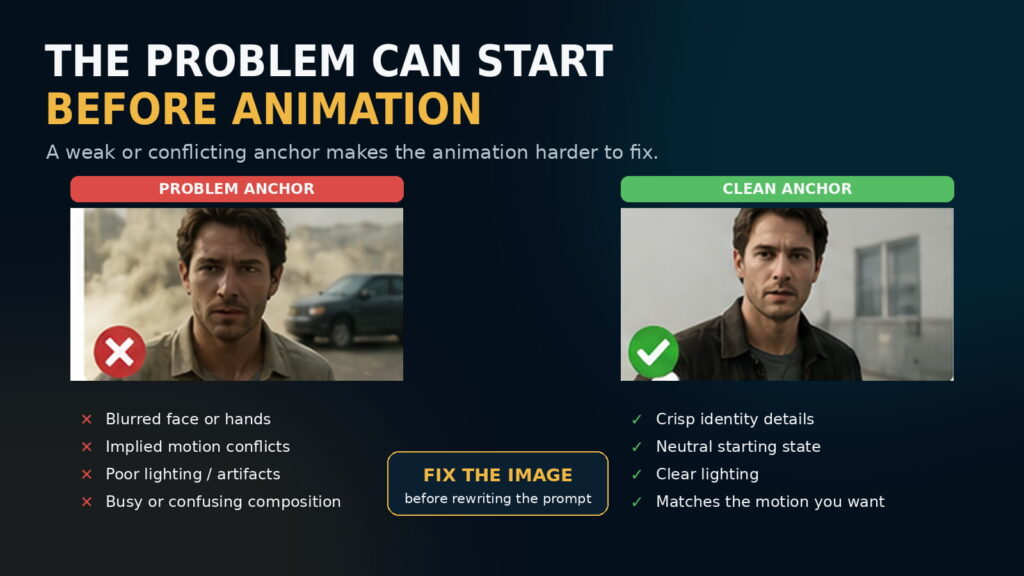
Sometimes the problem begins before you animate anything
One of the easiest ways to waste credits is to keep rewriting an animation prompt when the real problem is the source image.
In image-to-video generation, the starting image already tells the model a great deal about the subject, composition, lighting and style.
Runway’s current image-to-video guidance explicitly warns that defects such as blurry faces or hands can become more pronounced once the image is animated.
The image can also contain implied movement.
Dust behind a vehicle suggests that it is moving.
Motion blur suggests direction and speed.
A person frozen halfway through a stride suggests that walking is already under way.
If the prompt asks for behaviour that contradicts those visual cues, the model is being asked to fight its own first frame. Runway recommends inspecting the source image for these implied-motion cues when the requested motion repeatedly fails.
The practical lesson is simple:
If the anchor is wrong, fix the anchor before rewriting the animation prompt again.
Prompt length is not the real issue
There is a lot of advice suggesting AI video prompts should always be short.
That is too crude to be useful.
For straightforward image-to-video animation, simple prompting often works well because the image already defines much of the scene. Runway currently recommends focusing primarily on the required motion—subject action, environmental motion, camera movement, timing, direction and speed—and then adding detail only where necessary.
But that does not mean complicated shots must be described in ten words.
The better rule is:
Use the shortest prompt that completely and unambiguously describes what the shot needs to do.
A simple action deserves a simple prompt.
A genuinely choreographed scene may require more detail.
The real enemies are contradictory instructions, vague concepts and competing motions—not word count.
Shorter shots are not automatically better
Another popular workaround is to keep AI-generated shots extremely short so the model has less time to fail.
That can work.
But it is not a universal solution.
Runway’s own troubleshooting guidance notes that unwanted cuts may sometimes be improved by increasing the generation duration, giving the requested action enough time to unfold.
A better concept is action density.
A six-second shot of someone looking out of a window and slowly turning their head may be completely manageable.
A six-second shot asking them to stand, walk across a room, open a door, grab a bag, turn around and start speaking contains far more relationships that must remain coherent.
So the question is not:
Is the shot short enough?
It is:
Have you asked the model to accomplish a believable amount of action in the available time?
When the answer is no, splitting one overloaded shot into several deliberate shots can be more effective than endlessly refining the prompt.

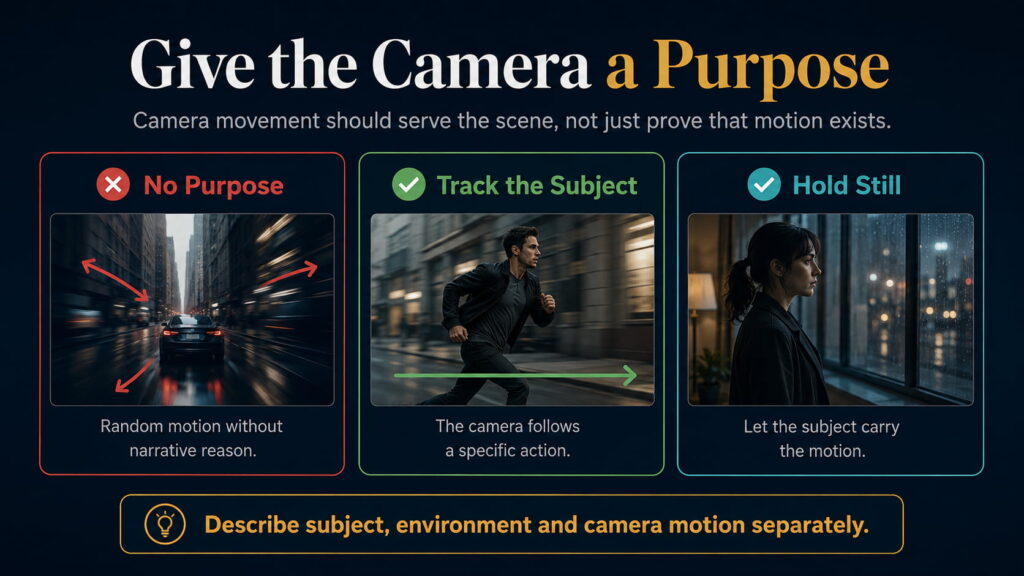
Give the camera a job
AI video has a strong tendency to demonstrate that it can move the camera.
That can produce beautiful results.
It can also produce footage where everything seems to push forward, orbit or glide even though the scene gives the camera no reason to move.
Real cinematography certainly uses movement.
But camera movement usually serves something.
A camera tracks because the subject is travelling through a space.
A slow push increases emotional emphasis.
A handheld shot creates immediacy.
A locked frame allows action inside the composition to carry the scene.
Runway’s current prompting documentation treats camera motion as a distinct control alongside subject and environmental movement, with options such as locked shots, handheld movement, pans, dollies and tracking.
The practical rule is not:
Keep the camera still.
It is:
Give the camera a purpose.
If you cannot explain what the camera movement contributes to the shot, it may not need to happen.
Sound can strengthen reality—or introduce another mismatch
Visual realism gets most of the attention, but viewers experience video through sound as well.
A foot hits the ground slightly before the footstep.
A heavy object lands with a sound that feels too light.
A room has ambience that does not match its apparent size.
Dialogue is clean and technically correct but feels detached from the face delivering it.
Each mismatch makes the scene less coherent.
Sound therefore matters because it confirms the physical event the viewer believes they are watching.
But audio has limits.
Excellent sound design cannot make a hand passing through a glass physically correct.
It cannot restore a face that has changed identity.
It cannot fix impossible geometry.
Sound should reinforce reality, not be expected to replace it.
Editing controls exposure, not just pacing
Suppose a generated eight-second shot is excellent for five seconds.
Then a hand starts deforming.
Nothing obliges you to use all eight seconds.
Cut at five.
That does not repair the original generation.
It controls how much of its weakness the audience sees.
Film production has always involved selecting the strongest take and the strongest portion of that take. AI video should not be treated differently.
The opposite mistake is cutting every generated shot so quickly that the audience never has time to connect emotionally with anything.
If the scene genuinely needs a six-second contemplative shot, the better solution may be to generate something capable of surviving for six seconds rather than hiding everything behind frantic editing.
The audience only judges what reaches the timeline.
But the timeline still needs to serve the story.
Know when to fix, regenerate or redesign
This is where a great deal of creator time can disappear.
Some problems belong in post-production. Minor stabilization, timing, color, ambience, pacing and small correctable artifacts may be cheaper to fix than regenerate.
Other failures belong in the generation itself. A drifting face, broken anatomy, failed contact, changing geometry or impossible physics usually suggests regeneration rather than increasingly elaborate editing.
Then there are shots that repeatedly fail across many attempts.
That is information too.
The scene may simply contain too many interactions, contradictory starting cues or physical requirements that the current model cannot deliver reliably.
At that point the rational choice may be to redesign the shot.
And sometimes the correct production method is not generative video at all.
Real footage, 3D, stock material and compositing remain perfectly legitimate tools.
The objective is to make the shot work.
It is not to prove that AI can generate every shot.

Coherence matters more than maximum realism
This may be the most useful principle of all.
Imagine two clips.
One is almost perfectly photorealistic, but the face shifts slightly, body movement feels odd, the camera floats and the sound does not quite match.
The other is somewhat stylized, but the identity is stable, movement suits the style, physical relationships make sense, camera behaviour feels deliberate and sound belongs to the environment.
The second may feel considerably more believable.
The lesson is not that photorealism is bad.
It is that realism mismatch is bad.
A clip becomes convincing when its components appear to obey the same reality.
The image.
The identity.
The movement.
The physics.
The camera.
The sound.
The edit.
Maximum detail in one component cannot compensate indefinitely for contradictions in the others.

So why does your AI video still feel fake?
Probably not because it needs more detail.
The newer problem is subtler.
The person looks real, but does not move quite like a person.
The object looks real, but does not behave quite like an object.
The camera looks cinematic, but has no reason to move.
The audio sounds polished, but does not quite belong to the event.
The face remains recognizable, but changes just enough to make you uncertain.
Each defect may be small.
Together they break the illusion.
AI video has become extraordinarily good at generating pictures that look convincing.
The harder challenge now is getting those pictures to behave like a believable event.
That is why the most useful question is no longer:
How do I make this look more realistic?
It is:
What in this shot is no longer behaving consistently with the reality the rest of the scene has established?
Find that break first.
Then decide whether to fix it, regenerate it or design a better shot.
That is increasingly where the difference between an impressive AI generation and convincing filmmaking is being decided.