
Category: Creator Tools

  • Your AI Video Looks Good. So Why Does It Still Feel Fake?

    Your AI Video Looks Good. So Why Does It Still Feel Fake?

    You generate a frame that looks almost photographic.

    The face is right. The lighting works. Skin has texture. Clothing looks natural. The background could have come from a commercial shoot.

    As a still image, there is very little to complain about.

    Then you press play.

    The person’s face changes almost imperceptibly as they turn. Their body moves, but it does not quite seem to have weight. A hand reaches for an object and the contact feels wrong. The camera glides through the scene with suspicious smoothness. Something in the background shifts. The sound is technically appropriate but somehow does not belong to what you are watching.

    Nothing may be dramatically broken.

    Yet the entire clip feels artificial.

    That gap between looking real and behaving real is becoming one of the most important problems in AI video.

    Recent research is finding exactly this distinction. NVIDIA’s PhyWorldBench was created because current video models can produce highly photorealistic content while still struggling to reproduce physical behaviour reliably across time. Its 1,050 test prompts examine everything from basic object motion to rigid-body interactions and human or animal movement.

    The problem is increasingly not what an AI video looks like when you pause it.

    It is what happens when you press play.


    A beautiful frame and a believable event are different achievements

    A still image only has to survive a spatial test.

    Does the face look believable? Is the lighting plausible? Do the materials look right? Does the composition resemble photography?

    Video has to pass all of those tests while changing through time.

    Now the viewer is also judging whether the same person remains the same person, whether feet actually appear to carry body weight, whether clothing reacts appropriately to movement, whether a hand really grips an object, whether the background stays geometrically stable and whether visible events produce the sounds we expect.

    That extra dimension is difficult enough that researchers are creating new benchmarks specifically for it.

    The 2026 What Are You Doing? benchmark, for example, contains 1,544 carefully annotated videos covering nine aspects of human generation, including actions, interactions and motion. The researchers created it because existing datasets and conventional evaluation metrics were not adequately capturing how well video generators handle complex human behaviour.

    In other words, a clip can be visually impressive and still fail as an event.


    Six realism checks reveal where the illusion is breaking

    When an AI-generated clip feels wrong, blaming “the prompt” is usually too vague.

    A better diagnosis separates six different problems.

    Identity and continuity: Do people, clothes, objects and locations remain themselves as the shot progresses?

    Physics and interaction: Do weight, contact, collisions and materials behave in ways that make sense?

    Human motion: Do faces, eyes, hands, posture and body movement behave naturally?

    Camera and world: Does the camera appear to have a reason for moving, and does the environment stay spatially coherent around it?

    Sound: Does what you hear belong to what you see, at the correct time and in the correct space?

    Edit: Are you actually showing the strongest part of the generation, for the amount of time it can survive convincingly?

    These problems can overlap, but separating them matters because the appropriate fix is different.

    A color mismatch may be an editing problem.

    A drifting face usually is not.


    Identity consistency has improved—but consistency does not mean freezing a face

    Character consistency is substantially better than it was even a short time ago.

    Modern workflows can use reference images, keyframes and other conditioning methods instead of asking the model to reinvent a character from nothing in every shot.

    But identity preservation introduces a more subtle challenge.

    A real face does not remain visually identical when someone turns, speaks, smiles or changes expression. Research such as ReactID is specifically trying to balance two objectives that can conflict: preserving a person’s identity while still allowing realistic, dynamic action.

    That gives creators an important target.

    The goal is not:

    Make every frame of the person’s face identical.

    It is:

    Keep the person recognizably the same while allowing the natural variations that real movement requires.

    Too little identity control produces drift.

    Too much can produce a face that feels unnaturally locked onto the character.

    Believability sits between those extremes.


    Physics remains one of AI video’s most stubborn weaknesses

    A model does not only have to know what a glass looks like.

    If someone picks it up, it has to understand where the fingers should contact it, how the hand moves around it, which parts become occluded, how the object follows the hand and what happens when it is placed back onto a surface.

    Add liquid and the model now has to deal with gravity, containment, material behaviour and collision as well.

    This is where visually excellent AI video can quickly expose itself.

    PhyWorldBench and the newer PAI-Bench both report the same broader problem: modern video generators can achieve strong visual fidelity while still struggling with physically coherent dynamics. PAI-Bench evaluates 2,808 real-world cases and found continuing weaknesses in physical plausibility and causal behaviour.

    That does not mean creators should avoid physical interaction.

    It means interaction complexity is a production variable.

    A person already holding a coffee cup is easier than showing them reach for it, wrap their fingers around it, lift it, pour from it and put it back down.

    Each additional relationship gives the model something else it must preserve correctly through time.


    Human motion is even less forgiving

    People are unusually sensitive to the way other people move.

    We may not consciously calculate biomechanics when someone walks, but we have spent our entire lives observing how humans transfer weight, how shoulders respond to arm movement, how expressions change during speech and how bodies anticipate contact with objects.

    That makes human movement a difficult place to hide mistakes.

    The What Are You Doing? researchers explicitly focus on actions and interactions because ordinary image-quality measures do not tell the whole story of whether a generated human actually moves convincingly.

    A person can therefore look outstanding while standing still and become noticeably synthetic as soon as they start walking, speaking, sitting or handling something.

    The problem is not simply anatomy.

    It is anatomy over time.


    Sometimes the problem begins before you animate anything

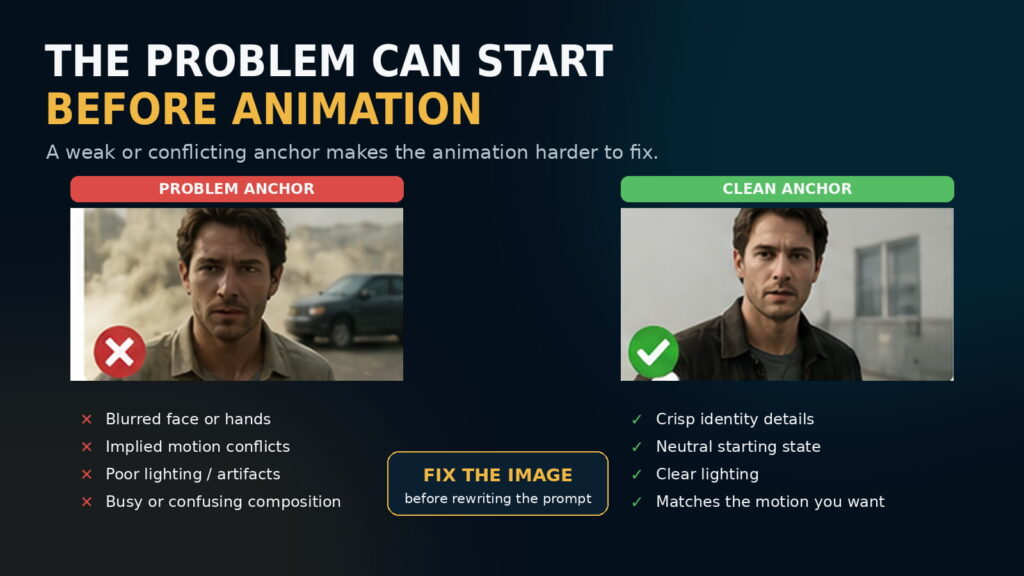
    One of the easiest ways to waste credits is to keep rewriting an animation prompt when the real problem is the source image.

    In image-to-video generation, the starting image already tells the model a great deal about the subject, composition, lighting and style.

    Runway’s current image-to-video guidance explicitly warns that defects such as blurry faces or hands can become more pronounced once the image is animated.

    The image can also contain implied movement.

    Dust behind a vehicle suggests that it is moving.

    Motion blur suggests direction and speed.

    A person frozen halfway through a stride suggests that walking is already under way.

    If the prompt asks for behaviour that contradicts those visual cues, the model is being asked to fight its own first frame. Runway recommends inspecting the source image for these implied-motion cues when the requested motion repeatedly fails.

    The practical lesson is simple:

    If the anchor is wrong, fix the anchor before rewriting the animation prompt again.

    Prompt length is not the real issue

    There is a lot of advice suggesting AI video prompts should always be short.

    That is too crude to be useful.

    For straightforward image-to-video animation, simple prompting often works well because the image already defines much of the scene. Runway currently recommends focusing primarily on the required motion—subject action, environmental motion, camera movement, timing, direction and speed—and then adding detail only where necessary.

    But that does not mean complicated shots must be described in ten words.

    The better rule is:

    Use the shortest prompt that completely and unambiguously describes what the shot needs to do.

    A simple action deserves a simple prompt.

    A genuinely choreographed scene may require more detail.

    The real enemies are contradictory instructions, vague concepts and competing motions—not word count.


    Shorter shots are not automatically better

    Another popular workaround is to keep AI-generated shots extremely short so the model has less time to fail.

    That can work.

    But it is not a universal solution.

    Runway’s own troubleshooting guidance notes that unwanted cuts may sometimes be improved by increasing the generation duration, giving the requested action enough time to unfold.

    A better concept is action density.

    A six-second shot of someone looking out of a window and slowly turning their head may be completely manageable.

    A six-second shot asking them to stand, walk across a room, open a door, grab a bag, turn around and start speaking contains far more relationships that must remain coherent.

    So the question is not:

    Is the shot short enough?

    It is:

    Have you asked the model to accomplish a believable amount of action in the available time?

    When the answer is no, splitting one overloaded shot into several deliberate shots can be more effective than endlessly refining the prompt.


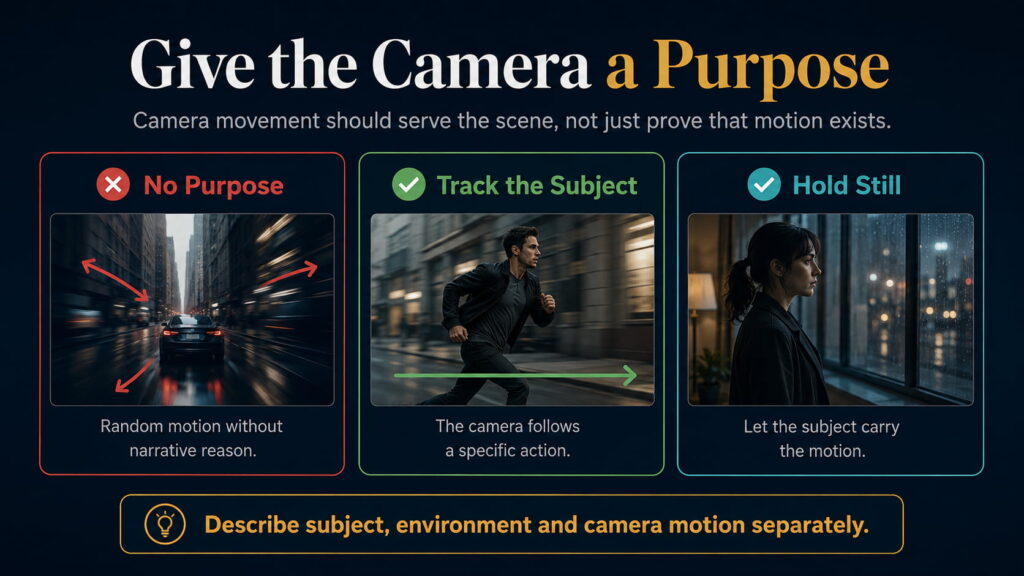
    Give the camera a job

    AI video has a strong tendency to demonstrate that it can move the camera.

    That can produce beautiful results.

    It can also produce footage where everything seems to push forward, orbit or glide even though the scene gives the camera no reason to move.

    Real cinematography certainly uses movement.

    But camera movement usually serves something.

    A camera tracks because the subject is travelling through a space.

    A slow push increases emotional emphasis.

    A handheld shot creates immediacy.

    A locked frame allows action inside the composition to carry the scene.

    Runway’s current prompting documentation treats camera motion as a distinct control alongside subject and environmental movement, with options such as locked shots, handheld movement, pans, dollies and tracking.

    The practical rule is not:

    Keep the camera still.

    It is:

    Give the camera a purpose.

    If you cannot explain what the camera movement contributes to the shot, it may not need to happen.

    Sound can strengthen reality—or introduce another mismatch

    Visual realism gets most of the attention, but viewers experience video through sound as well.

    A foot hits the ground slightly before the footstep.

    A heavy object lands with a sound that feels too light.

    A room has ambience that does not match its apparent size.

    Dialogue is clean and technically correct but feels detached from the face delivering it.

    Each mismatch makes the scene less coherent.

    Sound therefore matters because it confirms the physical event the viewer believes they are watching.

    But audio has limits.

    Excellent sound design cannot make a hand passing through a glass physically correct.

    It cannot restore a face that has changed identity.

    It cannot fix impossible geometry.

    Sound should reinforce reality, not be expected to replace it.


    Editing controls exposure, not just pacing

    Suppose a generated eight-second shot is excellent for five seconds.

    Then a hand starts deforming.

    Nothing obliges you to use all eight seconds.

    Cut at five.

    That does not repair the original generation.

    It controls how much of its weakness the audience sees.

    Film production has always involved selecting the strongest take and the strongest portion of that take. AI video should not be treated differently.

    The opposite mistake is cutting every generated shot so quickly that the audience never has time to connect emotionally with anything.

    If the scene genuinely needs a six-second contemplative shot, the better solution may be to generate something capable of surviving for six seconds rather than hiding everything behind frantic editing.

    The audience only judges what reaches the timeline.

    But the timeline still needs to serve the story.


    Know when to fix, regenerate or redesign

    This is where a great deal of creator time can disappear.

    Some problems belong in post-production. Minor stabilization, timing, color, ambience, pacing and small correctable artifacts may be cheaper to fix than regenerate.

    Other failures belong in the generation itself. A drifting face, broken anatomy, failed contact, changing geometry or impossible physics usually suggests regeneration rather than increasingly elaborate editing.

    Then there are shots that repeatedly fail across many attempts.

    That is information too.

    The scene may simply contain too many interactions, contradictory starting cues or physical requirements that the current model cannot deliver reliably.

    At that point the rational choice may be to redesign the shot.

    And sometimes the correct production method is not generative video at all.

    Real footage, 3D, stock material and compositing remain perfectly legitimate tools.

    The objective is to make the shot work.

    It is not to prove that AI can generate every shot.


    Coherence matters more than maximum realism

    This may be the most useful principle of all.

    Imagine two clips.

    One is almost perfectly photorealistic, but the face shifts slightly, body movement feels odd, the camera floats and the sound does not quite match.

    The other is somewhat stylized, but the identity is stable, movement suits the style, physical relationships make sense, camera behaviour feels deliberate and sound belongs to the environment.

    The second may feel considerably more believable.

    The lesson is not that photorealism is bad.

    It is that realism mismatch is bad.

    A clip becomes convincing when its components appear to obey the same reality.

    The image.

    The identity.

    The movement.

    The physics.

    The camera.

    The sound.

    The edit.

    Maximum detail in one component cannot compensate indefinitely for contradictions in the others.


    So why does your AI video still feel fake?

    Probably not because it needs more detail.

    The newer problem is subtler.

    The person looks real, but does not move quite like a person.

    The object looks real, but does not behave quite like an object.

    The camera looks cinematic, but has no reason to move.

    The audio sounds polished, but does not quite belong to the event.

    The face remains recognizable, but changes just enough to make you uncertain.

    Each defect may be small.

    Together they break the illusion.

    AI video has become extraordinarily good at generating pictures that look convincing.

    The harder challenge now is getting those pictures to behave like a believable event.

    That is why the most useful question is no longer:

    How do I make this look more realistic?

    It is:

    What in this shot is no longer behaving consistently with the reality the rest of the scene has established?

    Find that break first.

    Then decide whether to fix it, regenerate it or design a better shot.

    That is increasingly where the difference between an impressive AI generation and convincing filmmaking is being decided.

  • Your Creator Stack Is Costing Too Much

    Your Creator Stack Is Costing Too Much

    You open your bank statement and start adding them up.

    Twenty dollars for one AI assistant.

    Thirty dollars for an image generator.

    Another subscription for video.

    Another for voice.

    Another for music.

    Then editing.

    Design.

    Upscaling.

    Stock assets.

    Maybe a second AI assistant because it does one particular job better than the first.

    None of the individual payments looks especially alarming.

    Together, they can quietly become a substantial production expense.

    The problem is becoming harder to see because creator tools are no longer staying inside neat categories. Video platforms generate images. Image platforms generate video. Voice platforms create music and sound effects. Design platforms include AI models. General AI assistants increasingly cover research, writing, images and parts of production planning.

    So the question is no longer simply:

    Which creator tools are best?

    It is:

    Which of them are actually doing enough unique work to deserve another recurring payment?

    Adobe’s 2026 creator research found that 75% of creators using creative AI now consider it integrated or essential to their workflow. Yet 57% still said AI-generated output usually required moderate or extensive editing before it was ready to publish.

    AI is becoming normal.

    That does not mean every AI tool deserves a permanent subscription.


    Creator-tool categories are starting to collapse

    A few years ago, the creator stack was relatively easy to understand.

    One tool wrote.

    Another generated images.

    Another made video.

    Another created narration.

    Another edited everything together.

    Those boundaries are disappearing.

    Platforms such as Runway, Adobe Firefly and Freepik increasingly provide access to several creative capabilities—and sometimes several underlying models—inside one subscription.

    ElevenLabs has expanded beyond voice into music, sound effects, transcription and other creative tools.

    Canva increasingly combines design, stock, AI generation and publishing tools.

    General AI subscriptions are also broadening.

    That creates capability overlap.

    A creator can easily pay three different companies for image generation, two for video and several for AI assistance without consciously deciding that each subscription still solves a different problem.

    But overlap alone is not enough reason to cancel something.


    Overlap does not always mean waste

    Suppose you already have image generation inside three subscriptions.

    Does that mean a dedicated image generator should go?

    Not necessarily.

    Perhaps the specialist produces the visual style that defines your channel.

    Perhaps it reaches a usable result in two generations instead of eight.

    Perhaps its privacy controls matter.

    Perhaps it gives you a workflow that saves an hour on every project.

    The correct question is not:

    Does something else technically have this feature?

    It is:

    Can something else replace the result I actually care about?

    That distinction matters because two products can both advertise AI video generation while differing dramatically in:

    • motion quality;
    • character consistency;
    • control;
    • generation speed;
    • failure rate;
    • workflow;
    • export quality;
    • real cost per usable clip.

    Feature overlap is not the same as workflow redundancy.


    Start with what you actually publish

    A creator stack should not begin with a shopping list of software.

    Begin with the finished content.

    Take a normal publishing cycle and write down what genuinely has to happen.

    A faceless YouTube channel might need:

    research → script → visuals → narration → music → edit → thumbnail → publish

    A talking-head creator might need:

    research → outline → filming → editing → captions → thumbnail

    An AI filmmaker might need:

    story → reference images → generation → animation → voice → sound → upscaling → edit

    These workflows are completely different.

    So a universal “best creator stack” makes little sense.

    The first question is:

    Which capabilities appear in most of the content I actually publish?

    The second is:

    Which of those capabilities genuinely require paid software?


    Not every essential tool needs a subscription

    Editing is a good example.

    It may be one of the most important parts of the entire creator workflow. Adobe’s creator research suggests that much AI output still requires meaningful human refinement before publication.

    But essential does not automatically mean subscription.

    DaVinci Resolve, for example, offers an extremely capable free version covering editing, color, effects, motion graphics and audio. Resolve Studio is available as a one-time purchase rather than a recurring monthly fee.

    The same principle applies elsewhere.

    A creator can have an essential capability that is:

    free,
    owned outright,
    or included inside another subscription.

    Your workflow might require ten important capabilities without requiring ten recurring bills.


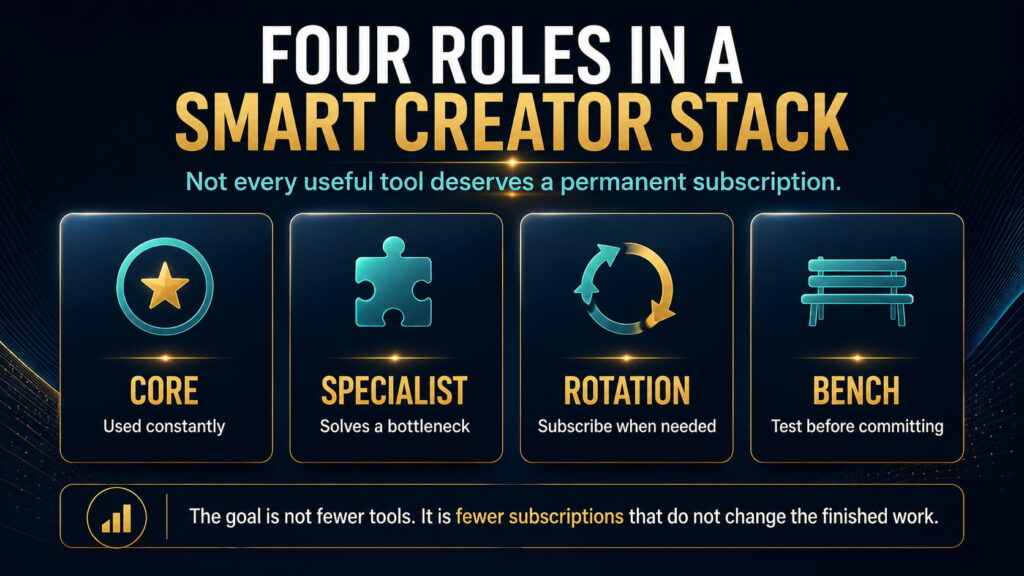
    A smart creator stack has four different roles

    Instead of treating every useful tool as permanent, divide the stack into four roles.

    Core

    These appear in most production cycles.

    Removing one would materially slow the workflow or reduce the quality of what gets published.

    For one creator, that might be an editor and a general AI assistant.

    For another, narration may be Core.

    Core tools are the strongest candidates for permanent subscriptions.

    Specialist

    A specialist solves one recurring bottleneck unusually well.

    Perhaps it produces your distinctive images.

    Perhaps its voices are noticeably better.

    Perhaps its video model delivers far more usable shots than your alternatives.

    A specialist earns its subscription when the advantage survives into the published work.

    Rotation

    Some tools are extremely useful—but only for certain projects.

    If you spend six weeks creating an AI-heavy documentary, a high-volume video subscription might be invaluable.

    If the next three months are mostly interviews, keeping that same plan active may make little sense.

    Rotation means:

    subscribe → produce → export what you need → downgrade or cancel

    rather than converting every useful service into permanent overhead.

    Bench

    This is where experimentation belongs.

    Free tiers.

    Trials.

    Pay-as-you-go credits.

    New models.

    Interesting tools you are still testing.

    Creators should experiment.

    But experimentation does not require twelve simultaneous recurring payments.

    A tool should leave the Bench only after repeated use proves that it belongs somewhere else.


    Before paying, ask seven questions

    A good tool still needs to earn its recurring cost.

    Frequency

    Do I use this in most real production cycles?

    If not, Rotation may be more appropriate than Core.

    Uniqueness

    What does it materially better than everything else I already pay for?

    “Better AI” is too vague.

    “Produces the visual style used in almost every thumbnail” is meaningful.

    Published impact

    Can the audience actually see or hear the difference?

    A technical improvement that disappears after editing, compression and publication may not justify another subscription.

    Economics

    Does the value created exceed the real cost?

    That means more than the monthly fee.

    Include credits, top-ups, failed generations, learning time and workflow friction.

    Rights

    Do I need the paid plan for commercial use, privacy, exports or licensing?

    Sometimes this alone justifies payment.

    Replaceability

    Ask:

    If I cancel this tomorrow, can something already in my stack perform 80–90% of the job well enough?

    If yes, the subscription needs a strong reason to survive.

    Exit friction

    Before cancelling, ask what disappears.

    Unused credits?

    Private work?

    Commercial rights?

    Custom voices?

    Stored projects?

    Trained assets?

    Cancellation can be correct while still being expensive if handled badly.


    Credits are not the real cost

    Creator platforms increasingly use their own internal currencies.

    One service offers 625 credits.

    Another offers tens of thousands.

    A third offers hundreds of thousands.

    Those numbers are largely meaningless across platforms.

    A credit has no universal value.

    Even within one service, different models may consume credits at radically different rates.

    So don’t compare:

    credits per month.

    Compare:

    usable output produced for the money.

    For video, useful metrics include:

    cost per usable clip

    and ultimately:

    cost per publishable minute.

    For images:

    cost per image that actually makes it into the project.

    For narration:

    cost per finished minute of approved audio.

    That matters because failed generations cost money too.

    A $20 service requiring eight attempts for every usable result may be more expensive than a $40 service that succeeds in two.

    Headline subscription price cannot tell you that.


    Aggregators can save money—but only if something actually gets cancelled

    All-in-one creative platforms are increasingly attractive.

    One subscription may provide:

    images,
    video,
    voice,
    music,
    sound effects,
    stock,
    upscaling,
    and editing.

    That can reduce billing accounts, file transfers and learning overhead.

    But an aggregator only saves money when it replaces something.

    If you buy the new all-in-one platform and continue paying every specialist subscription it supposedly replaces, you have not consolidated anything.

    Ask:

    Which existing subscription can I remove because this platform now handles that job well enough?

    If the answer is none, you added a tool.

    You did not simplify the stack.

    And specialists can still remain completely rational where they produce a visibly better result.

    The goal is not one platform.

    It is the right combination.


    Rotate subscriptions instead of accumulating them

    The production calendar should determine some of your software bill.

    An AI filmmaker may need an expensive generation tier while producing a short film.

    A voice-heavy documentary series may justify a larger narration plan.

    A design campaign may require another tool intensely for one month.

    Those needs do not automatically continue forever.

    Before rotating a subscription out, however, check:

    • commercial rights;
    • credit expiry;
    • stored projects;
    • exports;
    • custom assets;
    • cancellation rules.

    Some services preserve rights to work created while subscribed.

    Others may remove unused credits or access to certain features after cancellation.

    Rotation works best when planned rather than impulsive.


    Be cautious with annual plans

    Annual billing can produce meaningful discounts.

    It can also lock you into yesterday’s best tool.

    Creative AI is changing unusually quickly.

    Models improve.

    Platforms add competing capabilities.

    Pricing structures change.

    Credit rules change.

    A tool that looks indispensable today may be much less differentiated six months from now.

    That does not make annual plans a mistake.

    It means annual billing is most defensible for a proven Core tool.

    If you have used something almost every week for a long period and replacing it would genuinely hurt the workflow, an annual discount may be sensible.

    If you discovered the tool last Tuesday because everybody suddenly started posting about it, twelve months is a different commitment.

    A useful rule is:

    Annual billing should follow demonstrated usage, not enthusiasm.


    Paying for several general AI assistants can be rational—sometimes

    ChatGPT, Claude, Gemini and similar products increasingly overlap.

    Many creators can perform:

    research,
    brainstorming,
    writing,
    summarising,
    analysis

    with more than one of them.

    Paying for several may still make sense if each owns a genuinely different recurring workflow.

    Perhaps one is central to research.

    Another is tightly integrated with your files and productivity system.

    Another subscription replaces something else you would otherwise pay for.

    But if all three mostly perform:

    write → rewrite → summarize → brainstorm

    then the overlap deserves scrutiny.

    Again, the test is not whether the products are similar.

    It is:

    What recurring workflow becomes materially worse if this subscription disappears?


    Build the stack backwards from published work

    Take the last five pieces of content you actually published.

    For each one, list every paid tool involved.

    Then classify each tool:

    Essential — removing it would have materially harmed the result.

    Useful — it helped, but another tool probably could have done the job.

    Experimental — you used it, but the finished content did not really depend on it.

    Now look for subscriptions repeatedly appearing in the second and third categories.

    Those are the first ones to question.

    Not because they are bad tools.

    Because they may belong in Rotation or Bench rather than on permanent billing.


    A lean stack should not become a compromised stack

    There is another mistake worth avoiding.

    Cost cutting can become an obsession.

    If your visual identity depends on one particular image generator, keep it.

    If narration quality materially affects audience retention, keep the better voice tool.

    If one video platform consistently turns an idea into a usable clip while another wastes half your production day, the expensive one may actually be cheaper.

    The goal is not the smallest number of subscriptions.

    It is the smallest number of subscriptions that do not materially improve the work you publish.

    That protects both economics and quality.


    So which AI subscriptions do you actually need?

    There is no universal creator stack.

    A talking-head educator may need little more than a strong editor and one general AI assistant.

    A faceless narrated channel may justify an editor, voice tool and reliable visual source.

    An AI filmmaker may rationally spend much more because generation is not supporting the product.

    Generation is the production process.

    For every subscription, ask one final question:

    What stops working if I cancel this?

    If the answer is:

    Nothing important — cancel it.

    If the answer is:

    I occasionally need it — rotate it.

    If the answer is:

    Published quality noticeably declines — the specialist may deserve its place.

    If the answer is:

    It appears in almost every production cycle and replacing it creates more cost than the subscription — it belongs in Core.

    And if you are still figuring out why you need it:

    leave it on the Bench.

    The creator economy does not have a shortage of impressive software.

    It has an abundance of tools competing to become permanent expenses.

    The goal is not to build the biggest creator stack.

    It is to make sure every recurring payment helps create something that actually gets published.

  • Seedance 2.5 vs MiniMax H3 vs Kling 3.0: Which AI Video Model Should You Actually Use?

    Seedance 2.5 vs MiniMax H3 vs Kling 3.0: Which AI Video Model Should You Actually Use?

    AI-video comparisons have a problem.

    The model that produces the most impressive demo is not always the model that is easiest to direct, cheapest to iterate with, or most reliable once you need the same character to survive several shots.

    That difference matters because AI video is expensive in a very specific way: you do not pay only for the clip you keep. You also pay for the failures that never make the edit.

    A model can look extraordinary on attempt one and become frustrating by attempt six. Another can look slightly less spectacular but follow references more reliably. A third may only make sense once you learn its production workflo

    So the useful question is not simply: Which model makes the prettiest video?

    It is: Which model gives you the best chance of finishing the kind of video you actually want to make?

    That is what we set out to answer.

    Our research coded 511 criterion-level observations across 212 separate source lineages, while keeping large benchmark populations separate from individual production evidence. Collection stopped only after two consecutive evidence batches stopped materially changing the conclusions.

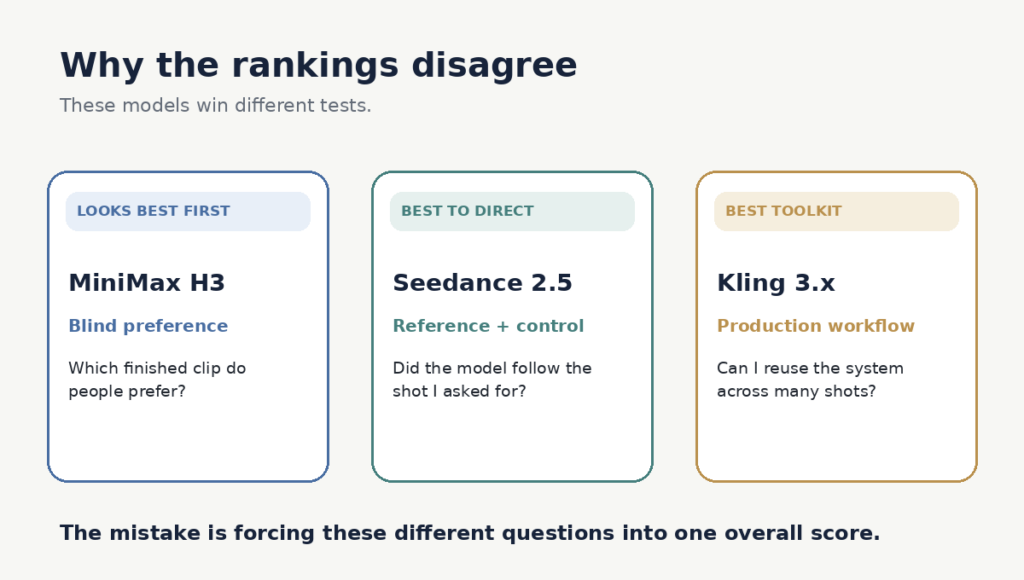
    Why the rankings disagree

    blind-preference test asks a simple question: Which finished clip do people prefer?

    A working creator has to ask something harder: Can I keep the character consistent? Will the model follow the camera move? How many rerolls will this take? What happens when hands touch objects? And what does a usable result actually cost me?

    Those are different tests.

    In the August 14 Image-to-Video Arena snapshot, MiniMax H3 ranked first at 1489±7, Seedance 2.5 second at 1484±12, while Kling v3 Pro scored 1356±6. But those votes measure visual preference—not workflow, retries, reference control or production cost.

    Once we separated those questions, the three models stopped looking like competitors for one crown. They started looking like tools built for different jobs.

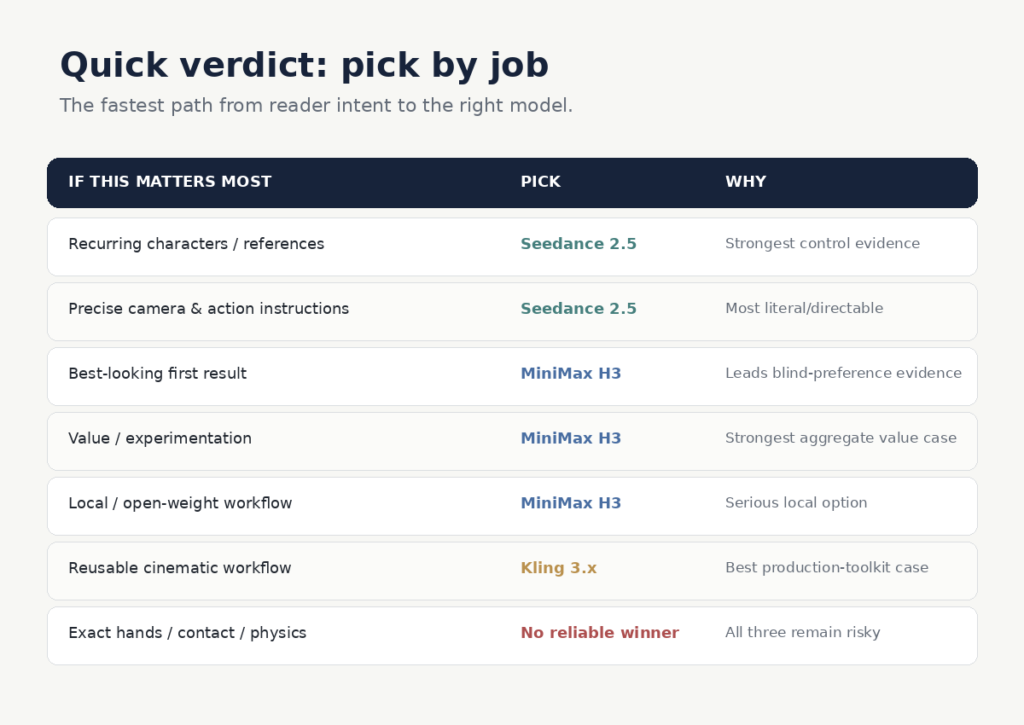
    The quick verdict

    The short version is:

    Seedance 2.5 makes the strongest case when control, recurring characters and reference fidelity matter most.

    MiniMax H3 makes the strongest case for visual first impression, value and local/open-weight workflows.

    Kling 3.x makes the strongest case as a reusable cinematic production toolkit.

    For exact hands, contact and complex physical interaction, there is still no reliable winner.

    Now the useful part is understanding why.

    Seedance 2.5: best when you need the model to obey you

    Seedance produced the clearest specialist win in our research.

    Its strongest evidence appeared in reference fidelity, recurring-character consistency, prompt adherence and camera execution. It also has the strongest practical case of these three for longer connected single-pass storytelling.

    ByteDance says Seedance 2.5 can generate up to 30 seconds in one pass and accept up to 50 multimodal reference assets. BytePlus currently offers 480p/720p Seedance 2.5 resource plans starting at $32 for 5 million tokens, valid for three months.

    If your process begins with:

    This is my character. This is my location. This is the camera move. These are the actions. Follow them.

    Seedance is the strongest fit of these three.

    The catch is that continuity is not the same as physical truth. Seedance can keep the person recognizable and the camera direction intact while still getting hand contact, object interaction or fast action wrong. Its premium also matters when a workflow requires several rerolls.

    Verdict: choose Seedance when directability and reference continuity matter more than raw price.

    Try Seedance 2.5 on BytePlus

    MiniMax H3: best when you want visual punch, value or local control

    H3 almost reverses the Seedance proposition.

    Its reference and camera evidence is more mixed, and its workflow is unusually sensitive to prompt structure, reference roles, duration and resolution.

    Yet H3 led the blind image-to-video preference evidence captured in our research and produced the strongest aggregate value signal of the three.

    MiniMax describes H3 as an open model with multimodal text, image, video and audio context, native stereo audio, output up to 2K, and generations up to 15 seconds.

    That gives buyers two legitimate paths:

    Direct / technical: use MiniMax or the available H3 weights where the license and hardware fit your use case.

    Hosted / convenient: use a platform such as AKOOL, which currently lists MiniMax H3 alongside other video models.

    The weakness is operator sensitivity. Hosted and local H3 can have very different economics, and higher-resolution local generation can become slow quickly.

    Verdict: choose H3 if visual first impression, experimentation economics or local ownership matter more than perfect literal obedience.

    View MiniMax H3 directly

    Try H3 in AKOOL

    Kling 3.x: best when you want a production toolkit

    Kling is the model most likely to look underrated if you judge it only by a leaderboard.

    Its real case is the system around the generator: multi-shot, reusable elements, binding and Motion Control.

    Experienced users are not merely asking Kling for a clip. They are building repeatable workflows around it.

    That can produce excellent human-centric cinematic work—but it also creates one of the largest gaps between best-case demos and ordinary production yield. Fast movement, hands, head turns, occlusion and complicated body interaction repeatedly show up as failure triggers, and retries can become expensive.

    Kling’s pricing is credit-based and varies with model, resolution, audio and plan. Because those costs move and depend heavily on settings, we would not publish one universal “Kling costs $X per second” figure.

    Verdict: choose Kling if you want to learn and operate a reusable cinematic workflow rather than simply generate one impressive clip.

    Explore Kling 3.x

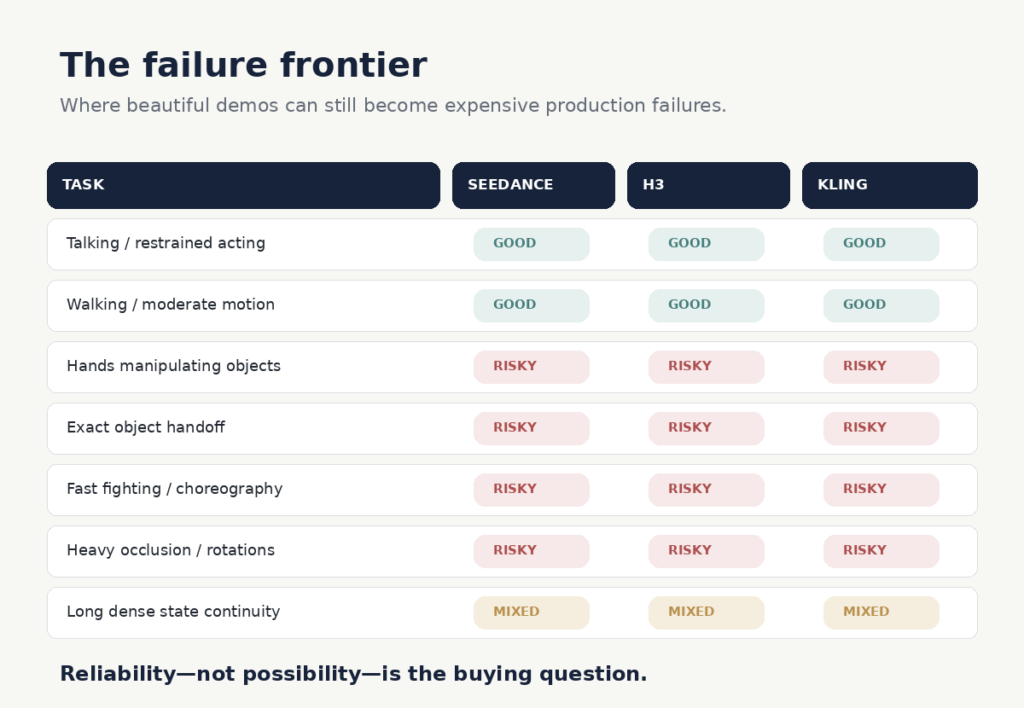
    The failure frontier: none of them has solved this

    All three can produce spectacular examples of difficult motion.

    That is different from producing them reliably.

    The recurring danger zones were remarkably consistent: hands manipulating objects, precise object handoffs, contact-heavy choreography, heavy occlusion, large body rotations and long scenes where exact object or clothing state has to survive every change.

    If a paid production depends on one of those actions, the smarter decision may be to redesign the shot rather than simply switch models.

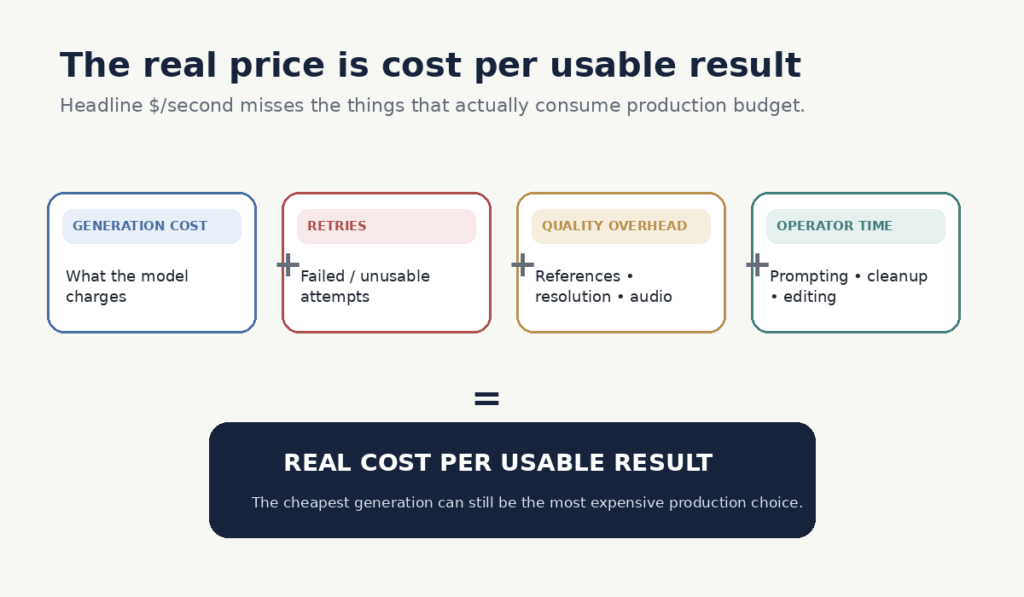
    The real price is cost per usable result

    Most comparisons show price per generated second.

    That misses the production cost.

    A cheaper model that needs five attempts can easily cost more than a premium model that gives you the usable result in two. Add reference charges, resolution or audio overhead, and operator time, and headline pricing becomes even less informative.

    That is why H3 can have a strong value case despite its workflow complexity.

    It is why Seedance’s premium can make sense when one controlled longer take replaces several independently generated clips.

    And it is why Kling’s economics can look completely different for an experienced Motion Control user and someone repeatedly burning credits on difficult shots.

    Price per generated second tells you what generation costs. Cost per usable result tells you what production costs.

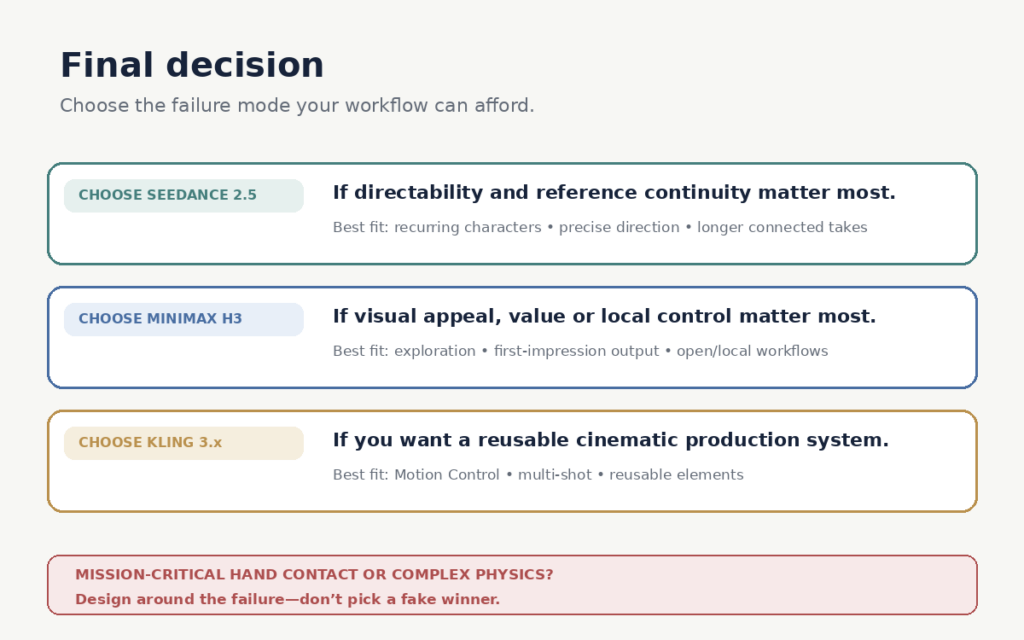
    Which one should you choose?

    Choose Seedance 2.5 if recurring characters, references and precise creative direction matter most.

    Choose MiniMax H3 if you prioritize visual appeal, experimentation value or local/open-weight control.

    Choose Kling 3.x if you want a reusable cinematic workflow built around references, Motion Control and multi-shot production.

    And if your project depends on perfect hands, object contact or complicated physical choreography:

    choose the shot design before you choose the model.

    Because the useful question is no longer:

    Which AI video model is best?

    It is:

    Which model fails in ways my workflow can afford?

    Frequently asked questions

    Which AI video model is best overall: Seedance 2.5, MiniMax H3 or Kling 3.x?

    There is no defensible universal winner. Seedance 2.5 has the strongest case for directability and reference consistency, H3 for visual preference and value, and Kling 3.x for reusable cinematic production workflows.

    Which is best for consistent characters?

    Seedance 2.5 produced the strongest evidence for recurring-character consistency and reference fidelity in our research. Kling can also be strong when references and its production tools are used well, while H3 was more variable.

    Which is the cheapest to use?

    Headline generation price is only part of the answer. MiniMax H3 showed the strongest overall value signal, but the real cost depends on retries, resolution, hosting, references and how often a generation produces something you can actually use.

    Which model is best for realistic human movement?

    None of the three is consistently reliable once scenes involve difficult hand contact, object interaction, heavy occlusion or complex choreography. For those shots, redesigning the action can matter more than changing models.

    This comparison is based on a structured review of public evidence rather than a small internal test.
    We coded 511 qualitative criterion-level observations across 212 distinct source lineages, alongside separate quantitative benchmark measurements.
    Evidence was classified by model version and evaluation criterion, deduplicated, weighted by source quality and relevance, and checked for contradictions. Older model versions were treated as historical evidence unless the same behaviour remained visible in the current generation.
    Collection stopped after two consecutive research batches produced no material change in the key conclusions.
    The objective was not to identify the model with the best promotional demo. It was to determine which model is most defensible for different real production jobs.

    Sources and updates

    AI-video models change quickly. We verify major version, pricing and capability claims against current official documentation where possible, while performance conclusions draw from the broader evidence base described in our methodology.

    Rankings and product capabilities may change as new model versions are released. When that happens, we update the affected evidence rather than quietly treating results from an older model as if they describe the current one.

    About NakuNet

    NakuNet researches technology from the buyer’s side.

    We combine official documentation, benchmarks, independent testing, creator experience and broader public evidence to work out not simply what a product claims to do, but where it is actually useful, where it fails and who should spend money on it.